
If you are new to participating in National Novel Writing Month, this post is for you. It’s also for any old hands who haven’t declared their project yet!
 Even if you don’t have an idea of what you want to write, it’s time to go out to www.nanowrimo.org and sign in or sign up. Getting that out of the way will inspire you. You will also have access to the many helpful resources NaNoWriMo.org has to offer.
Plus, you can get your badges for each milestone you achieve, and if you make your goal, you’ll get your “winner’s” certificate.
Navigating the website at www.nanowrimo.org can be confusing. However, if you take the time to explore it and get to know all the many tricks to using it, you’ll be more comfortable with it.
If you haven’t been a participant for several years and are considering joining again, you might find the new website is radically different from the old site. Many features we used and loved in the past are no longer available, but it includes numerous features that really are nice. The following screenshots will help you find your way around the website:
First, go to www.nanowrimo.org. This is the landing page:
 Once there, create a profile. You don’t have to get fancy unless you are bored and feeling hypercreative.
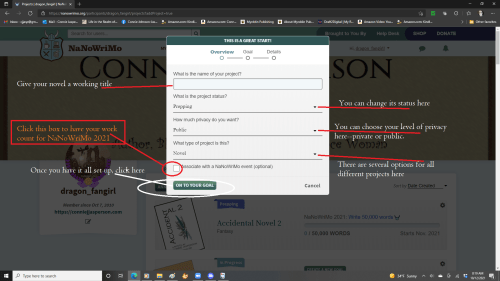
Next, declare your project: Give your project a name if you have one. I don’t have a working title yet. I’m just going with 30 Days of Madness and Pot Pies 2023 since I haven’t thought of a snappy title just yet.
Pick the genre you intend to write in, if you know it. Write a few paragraphs about your intended project, just a little synopsis of what your idea is. The following screenshot is from 2021, but everything is the same.
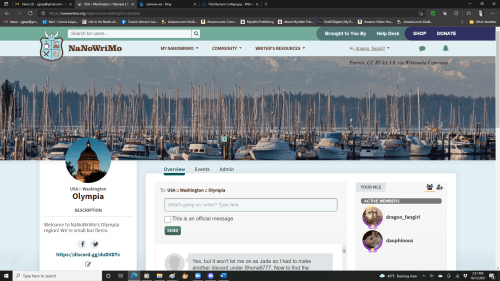
 You can play around with your personal page a little to get used to it. I use my NaNoWriMo avatar and name as my Discord name and avatar. This is because I only use Discord for NaNoWriMo, SFWA, and one other large organization of writers.
While you are creating your profile, write a short bio, and with that done, you’re good to go. If you’re feeling really creative, add a header. If you’re an artistic person, open MS Paint and make a placeholder book cover—have fun and go wild.
 Next, check out the community tabs. If you are in full screen, the tabs will be across the top. If you have the screen minimized, the button for the dropdown menu will be in the upper right corner and will look like the blue/green and black square to the right of this paragraph.
When the button is clicked, the menu will be on the righthand side instead of across the top.
Your regional page will look different from ours because every region has a different idea of how they present themselves, but it will be there in the Community tab. And don’t forget to check out the national forums, also on the Community tab.
 You may find the information you need in one of the many forums listed here.
Every year, I have to talk an author off the edge, as an unimaginable tragedy has occurred–their computer crashed, and their entire manuscript has been lost.
Losing your files is a traumatic experience, one some authors never recover from. They give up and never write again. Others pull themselves together and soldier on, but this is something that can be averted if you’re smart at the outset.
I use a cloud-based storage system because entire manuscripts can go missing when a thumb drive or hard drive is corrupted.
 Make a master file folder that is just for your writing. I write professionally, so my files are in a master file labeled Writing.
Inside that master file are many subfiles, one for each new project or series. My subfile for this project is labeled Lenns_Story.
 Give your document a label that is simple and descriptive. My NaNoWriMo manuscript will be labeled: Stowe_Bridge_NaNoWriMo_2023.
First of all, you need to save regularly. I use a file hosting service called Dropbox. I have a lot of images on file, so I pay for an expanded version, but they do have a free version that offers you as much storage as a thumb drive. I like using a file hosting service because it can’t be lost or misplaced and is always accessible from my desktop or laptop. I work out of those files, so they are automatically saved and are where I want them when I closeout.
You can use any storage system that is free to you: Google Drive, OneDrive, or a standard portable USB flash drive.
Save regularly. Save consistently. DON’T put off saving to a backup of some sort – do it every day before you close your files.
 This year we will have write-ins at the local library. The authors in our region will come together and write for two hours and support each other’s journey. We will also meet via the miracle of the internet, using Discord and Zoom. My co-ML and I are finalizing a schedule for November.
Our region will use the Discord Channel for daily write-ins in the general chat and word sprints in our wordwars room.
Check out what your region offers you for year-round support. You might be amazed what they are doing.
Next up: Worldbuilding–creating societies, science, magic, and the paranormal.
The #NaNoPrep series to date:
- #NaNoPrep: creating the characters #amwriting | Life in the Realm of Fantasy (conniejjasperson.com)
- #NaNoPrep: The initial setting #amwriting | Life in the Realm of Fantasy (conniejjasperson.com)
- #NaNoPrep: What we think the story might be about #amwriting | Life in the Realm of Fantasy (conniejjasperson.com)
- #NaNoPrep: The Heart of the Story #amwriting. | Life in the Realm of Fantasy (conniejjasperson.com)


 Life in the Realm of Fantasy
Pingback: #NaNoPrep: How a strong theme will help you write that novel #amwriting | Life in the Realm of Fantasy
Pingback: #NaNoPrep: worldbuilding – society and how we live #amwriting | Life in the Realm of Fantasy
Pingback: #NaNoPrep: worldbuilding – war elephants, magic, and the paranormal #amwriting | Life in the Realm of Fantasy