
 WordPress people…you have pissed me off.
For a year now you have been trying to shove this new, less-than-useful dashboard down my throat, and for that same year, I have refused to use it. You allowed me the option to stay with the expanded version that played to my needs, and so I didn’t complain.
Today, however, you cut off my simple access to the old, better-for-my-purposes dashboard, and forced me to hunt for a way to get back to it. So rather than the post I had intended, we are going to discuss how a determined blogger can get around your arbitrary decision.
I do not post my blogs from a cell phone. For those people who do, I am sure the bland wall of white fog that is the new default dashboard is fine, but for me it is NOT USEFUL.
First of all, the writing is pale blue and gray.
I have poor eyesight. This is a large world, so I am sure I am not the only blogger out there with compromised vision.
For me, pale blue on white becomes a vast expanse of bluish white, against which I have to strain my eyes to see what few buttons a blogger is allowed the use of.

Oh, sure, I posted a while back on how to use this crappy new dashboard, and I CAN use it. See my post Blogging is Writing Too.
But just so you know, WordPress people, forcibly limiting my options is making me reconsider my loyalty to you.
However, being the stubborn old lady that I am, I have found a way to get back to the old dashboard. You have to know how WordPress works in the first place to find it, but I am tenacious.
In the upper lefthand corner of the new default dashboard are the words “My Stats.”
Click on this, and it will take you to the stats page.
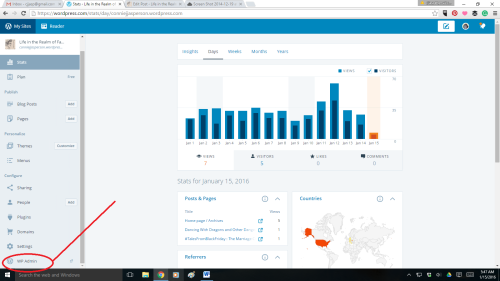
On the left side of the page is a menu, and at the bottom of that menu is the button for “WP Admin.”
As this is my blog, I am that person and when I click on it, it takes me to this page:
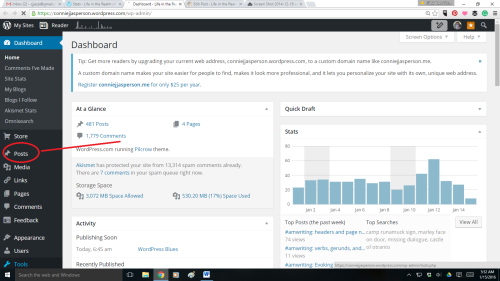
This is the Admin Dashboard. You will note that in the center of the lefthand menu is the word “Posts.”
Click on that and you will find yourself able to access all the options you are used to having at your command.
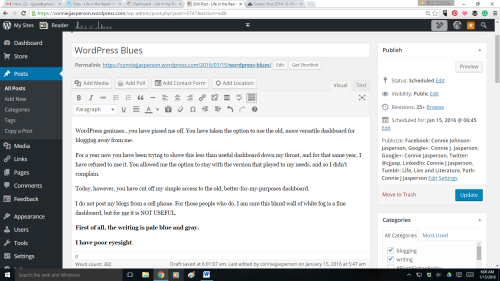
I actually use my dashboard like a professional blogger. But I am also an old lady and when I am thwarted, I get angry.
When I am angry, I blog about it.
WordPress people–I’m sure you have a good reason for limiting a blogger’s ability to access all the tools they may need. However, and I am just guessing here, I suspect that the majority of bloggers are not posting blogs from their cell phones.
People at WordPress: I suspect that the majority of your bloggers are sitting in front of a PC or laptop.
This blogpost is for all of those people.


 Life in the Realm of Fantasy