
Here we are in the bright new year, and one way to help keep it bright and shiny is to never lose your manuscript.
 If you have been a computer user for any length of time, you know that hardware failure, virus attacks by hackers, and other computer disasters will happen. They’re like the Chelyabinsk meteor—hard to predict, difficult to recover from, and a horrible surprise when they happen.
Nothing is worse than discovering that all those hours of work on a labor of love were for nothing. A consistent system for saving and backing up the files in each project will save you time and tears.
As a municipal liaison for NaNoWriMo, I met many authors who didn’t know how to properly save files. They were new writers who didn’t understand how important it is to keep the old file and save it as a new one to work out of. They made massive cuts to the storyline, but instead of first renaming the file, they saved it and continued working. Those original sections were gone, along with the ideas and a lot of good prose that could have been reused elsewhere.
 This year, I met a young man who, being new to using a word processing program, forgot how he named his 2022 manuscript. He couldn’t find it when he decided to start writing again. I showed him how to search for files by date, taught him how to name documents, and taught him how to create a master file for all the files generated in the process of writing his book.
Also, keeping an external backup updated is crucial. If the computer dies, months of work won’t be lost forever. You will have a backup.
I generate work in a variety of subgenres, which complicates things. Each project is intended for submission to different places, so I have a large number of files in my writing folder. That’s why I use a cloud-based file hosting service.
- I can’t misplace or lose it.
 I work out of Dropbox, so when I save and close a document, my work is automatically saved and backed up to the cloud. My files are always accessible even when working offline, so if the power goes out, I can access my work for as long as my computer’s battery holds out.
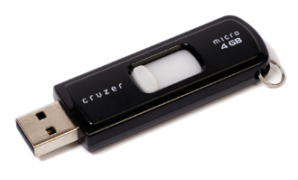
Many cost-free storage systems are available for your backup—Google Drive, OneDrive, or even a standard portable USB flash drive. Some people also purchase an external hard drive, which I have done for my images and graphics files.
Most people have never had a reason to learn how to label files consistently. It is a skill I developed, as properly filing things was part of my job. I was responsible for naming and saving my employers’ files in a consistent and manageable way. In 1993, when my office went from paper to PC, those skills transferred easily.
Each book will generate several files.
- The original first draft manuscript and the subsequent drafts.
- Documents detailing research and a list of sources and their links.
- Random notes we generate in the process of creation.
 One thing I hear from new writers is how surprised they are at how easily something that should be simple can veer out of control. The worst thing that can happen to an author is accidentally saving an old file over the top of your new file or deleting the file entirely.
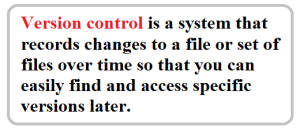
Version control is a system that enables us to maintain an accurate history of changes to a file (or set of files) over time. We can return to specific versions as needed later, so nothing has been lost.
The way you structure your filing system will evolve as you discover what works best for you. It will ultimately be centered around:
- what you’re filing,
- the number of files you are working with,
- the various sub-categories (subfolders) your system needs to be broken down into.
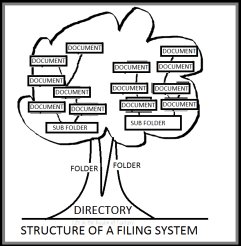
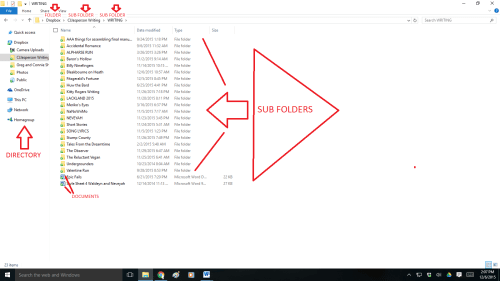
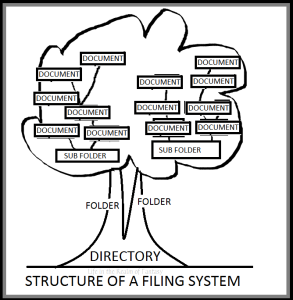
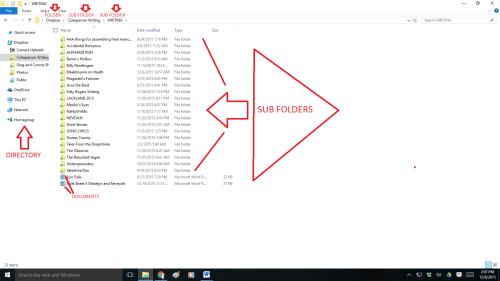
A filing system is quite simple. For most documents, my system is a standard office-type system that consists of:
DIRECTORY> FOLDERS> SUB-FOLDERS> DOCUMENTS
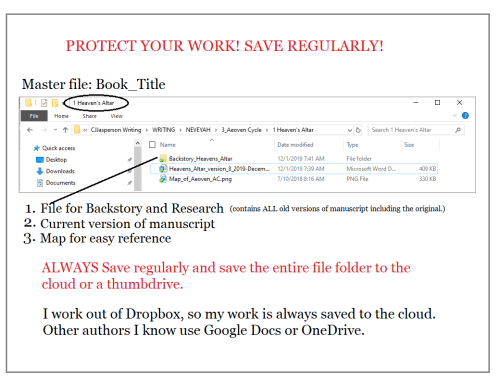
My first draft of any manuscript will be given a Master File with a working title. That will be a handle to carry it by.
Within that master file, I have maps and every version of the original manuscript. The subfolders are clearly labeled and contain the old versions and any research that pertains to it.
Why do I keep so many versions of a manuscript? Every draft of that novel has some good things that I had to set aside for the sake of the story arc, but I never delete old files. You never know when you will need something you have already written.
- The internet says using an underscore ( _ ) instead of a space in file names is a best practice. This is because some applications and computer scripts may not recognize spaces or will process your files differently when using spaces. If you intend to submit your work to a publisher, use the underscore to indicate spaces in the title to label any file you submit to them.
 I make a separate subfolder for my work when it’s in the editing process. That subfolder contains two subfolders, and one is for the chapters my editor sends me in their raw state with all her comments:
- My editor saves each individual chapter as a separate new document, giving them a specific name: RoA_edit1_IL_01-10-22. (Ruins of Abeyon, Irene Luvaul edit 1, January 10, 2022.)
She does this because she edits one or two chapters a day and sends them to me that evening, and I save them in the subfolder for the raw edits. The other subfolder is for the finished work with the completed revisions:
- I make the revisions Irene suggests and then save the chapter into that second folder: RoA_cjj_revised_jan-11-22. (Ruins of Abeyon, Connie J. Jasperson, revised January 11, 2022.)
We don’t lose the order of chapters because we have a reliable system for naming files, which we ALWAYS use. Consistency is critical when labeling files.
One thing to be aware of is to save it as a Word DOCUMENT and not a Template. If you save it as a template, you will keep getting a warning that the document is read-only and won’t let you save your changes.
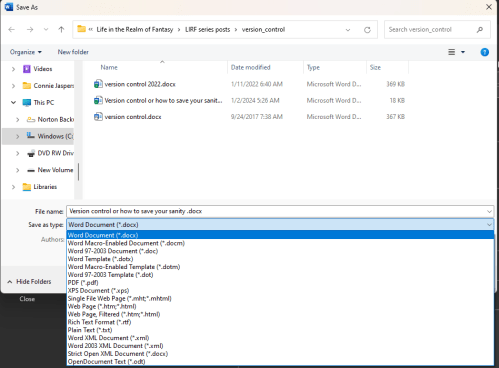
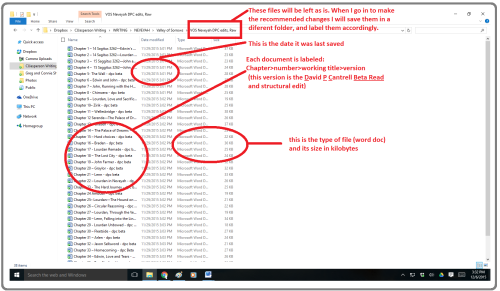
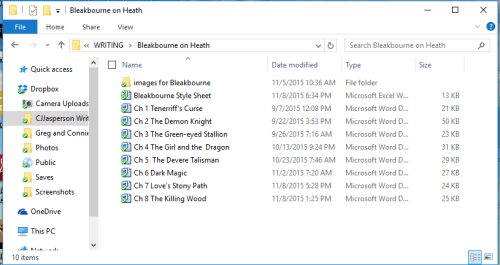
‘Libraries’ is the screen that opens when you click “Save As” and is where you go to manage your documents, music, pictures, and other files. You can browse your files the same way you would in a folder or view your files arranged by properties like date, type, and author. These pictures, above and below, are of File Explorer libraries (Microsoft Windows file listing browser).
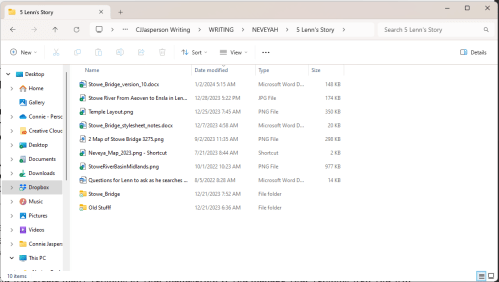
Name your files consistently and save each version in the master folder. Below is the master file for Lenn’s Story, the working title for my 2023 NaNoWriMo project (which still has no title).
You will create many versions of your manuscript. You will find the road much easier if you manage your versions well. And the event of equipment failure, you will have access to the most recent version of your work because it was regularly backed up to the cloud or an external drive.
 In an instant, an entire manuscript is gone, wiping away hundreds of hours of work on their labor of love.
 A filing system is quite simple, rather like a tree from the ground up. For most documents, my system is a standard office-type system that consists of:
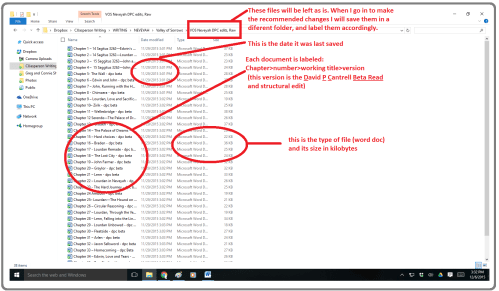 Name your files consistently and save each version in a separate folder within the master folder. Below is the master file for Valley of Sorrows.
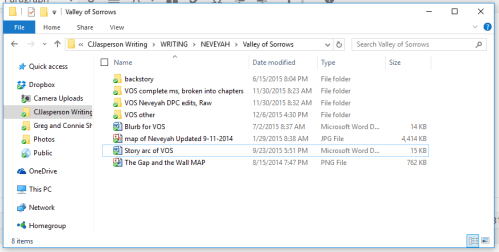 You may create many versions of your manuscript. YOU MUST manage your versions with meticulous care, or you will lose files, have to rewrite sections you just wrote, and which were brilliant, or any number of horrible, irritating situations.







 Life in the Realm of Fantasy