Tag Archives: blogging

#amblogging: How to use WordPress to Publicize your blog posts

Blogging is one thing writers need to do regularly, even if it is only once or twice a month. However, it’s hard to gain readers when you first begin to blog. After all, blogging requires writing, and many writers feel it takes them away from their ‘real’ work.

But what is our real work? We write, hoping people will read our work, and our blog is the way to connect with those readers. For the Indie Author, your blog is your store, and is where your books are sold.

However, if we have a limited audience, we feel defeated in our efforts to gain readers, and many authors let their blogs languish for that reason.

All blogs begin with a small readership. Because we all begin small and want to gain readers, it’s necessary to use every platform available to get the word out and WordPress offers us many opportunities to do just that.

I’m taking you through the WP Admin menu, because some WordPress.org users don’t have the universally dreaded “New and Better” way to post via the “improved editor” menu, but they still need to publicize their blogs. The options and steps are pretty much the same on the WordPress.com “improved editor” menus.

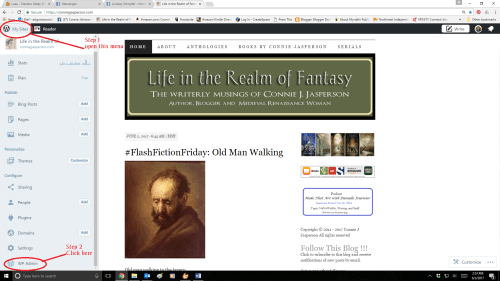
On the dropdown menu to the left of your Blog title, under the words “My Sites,” click the dropdown menu. Scroll all the way to the bottom and open the WP ADMIN menu.

Step One: In that menu, scroll down to “Settings” and open that menu.

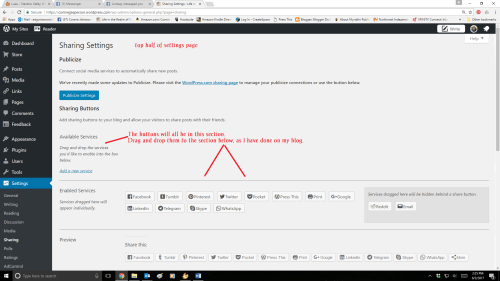
Step Two: In the Settings menu, open “sharing” and click on it. that will take you to the “Sharing Settings” page. Click on the button that says, “Publicize Settings.”

That will open a list of what I think of as blog warehouses, places that collect blogs and offer them to their regular readers.

Step Three: You want to activate as many of them as you can.

Follow these Screenshots, in this order:

Step Four is an important step especially for those who use twitter to promote their posts to the world. Because I have my blog set to automatically post to twitter, I use a hashtag in the title of every blogpost. If you don’t make twitter your tool, you are missing out on an important and simple “publicizing” opportunity:

I highly recommend blogging regularly, at a minimum two posts a month. Writing blog posts develops your writing craft. Also, your blog is where you talk about your interests, your writing, and is where potential readers can find your books.

If you really want your work to be visible, use the options and tools WordPress offers you.

25 Comments

Filed under writing

#amwriting: Humility, or what I’ve learned from blogging

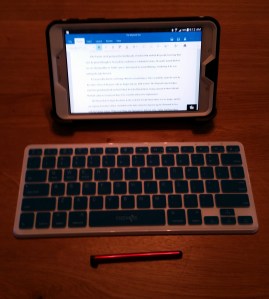
Tablet_KeyBoard_©cjjasp_LIRFDec19_2016One of the best things about being an indie author is the freedom I have regarding my writing schedule. Unfortunately, I’m someone who frequently over-commits myself, so that freedom is also a curse.

Blogging regularly is part of my writing commitment. It’s a good way to connect with readers. This website is where I advertise my books, discuss the craft of writing, and talk about my life in general.

I have made a personal commitment to post three times a week on this blog, plus I contribute posts to three other blogs. I do this because each time I write an essay on the craft of writing, I clarify my own thoughts on those points. Also, posting flash fiction every Friday keeps me sharp and keeps me writing little bits of prose I might otherwise not have the chance to write.

I’ve mentioned this before (old people frequently repeat themselves): I first began blogging because my former publisher insisted. It was a struggle and I wasn’t good at it because those posts were pathetic attempts to write about current affairs as a journalist, something that has never interested me. For a blog to be successful, you should discuss what you are passionate about, be it travel, sports, cooking, motorcycles, books, or writing craft.

What I learned from that otherwise negative experience is important: it wasn’t until I stopped trying to fit into a mold someone else had designed for me and began writing about my interests that I learned to love the craft of blogging. When I made that connection and commitment to writing about what I enjoy, I began to grow as a writer.

I admit it’s a challenge. I have to work hard to proofread my own work and then publish it. When I’ve had a small success and am in danger of becoming too full of myself, blogging never fails to provide me with a sharp dose of reality. Nothing bursts your bubble of self-importance like discovering gross errors and bloopers several days after you published the post.

Or years.

Oops.

Regularly writing blogposts has made me a “thinking” author, as well as a “pantser.” I can write using the “stream of consciousness” method, or write from an outline of whatever interests me at the time. I do the research, and the post begins to write itself.

A good blogpost should have at least 500 words but not more than 1000. This means I have to keep my area of discussion narrow, and not get sidetracked. Also, flash fiction can only be up to 1000 words, so keeping it small is sometimes the issue.

Writing blogposts isn’t that difficult per se, as I can knock one out in less than an hour if I’m fired up about the subject. The real challenge of blogging regularly is finding interesting content. But that is part of the challenge.

The way I handle my blogging commitments is this: during the week I make a note of any interesting topic that might make a good blogpost. The only day I write blogposts is Sunday, but I write the entire week’s posts that day. If there is a lot of research involved I make footnotes as I go, and getting the articles ready could take the whole day. Usually writing the posts for the week only involves the morning.

For a blogger who only posts once a week, it should only take an hour or so.

I spell-check and self-edit my posts as well as possible. Then I go to each website, copy and paste the document into the body of the post, make any adjustments needed, add pictures, and edit the date for publishing so they are prescheduled for right publishing date.  Prescheduling allows my blog to post a new article three times a week at 06:45 am my time (on a Monday, Wednesday or Friday) which is 09:45 US Eastern time. It updates without my having to babysit it.

I do have to be observant when I am scheduling these things. Occasionally I accidentally hit the “publish immediately” button, which means I end up with an extra post that week whether I meant to or not. When that happens I sometimes use naughty words, such as, “Sassafras!” And “Dirty Words!” When I get done cursing, I either skip the Monday post or write an extra one.

Having the ability to write each post ahead of time, edit them, and select the date for publishing allows me work the rest of the week  on my true job, which is writing novels.

If you are an author, you really should be blogging too. If you want to know more about getting your own blog up and running, see my post of December 14, 2015, Blogging is Writing TooThat post has screenshots and step-by-step instructions. It also talks about how to use the new default system here at WordPress so that you can insert pictures and make a nice looking post.

3 Comments

Filed under blogging, writing

#amblogging: trying to get the word out.


windows dialogue box 6 dude are you sureIt’s hard to gain readers when you first begin to blog. The reason we write is so people can read our work, and if we have a limited audience, we feel a little defeated in our efforts to gain readers.
Because we want to gain readers, it’s necessary to use every platform available to get the word out and WordPress offers us many opportunities to do just that. On the dropdown menu to the left of your Blog title, under the words “My Sites,” click the dropdown menu.

In that menu, scroll down to “sharing” and click on it. that will take you to the “Sharing Settings” page. Click on the button that says “Publicize Settings.”

That will open a list of what I think of as blog warehouses, places that collect blogs and offer them to their regular readers. You want to activate as many of them as you can.

My blog automatically post to Path, Stumble Upon, Tumblr, Google+, Networked Blogs, Facebook, and Twitter, and each one of those venues has increased my readership.

I don’t normally post on Saturdays, but I am trying a new (to me) thing called Bloglovin, hence the html in the first paragraph of this post–they want you to put their code in a new post. As my blog automatically posts in a variety of different places, I figured it would confuse people if I posted a blog that just had their code in it, so I am bringing you all along on this journey!

Bloglovin is not in the WP publicize menu yet, so you have to go out to their website and try to follow their instructions, which I am doing at this moment. I will keep you all posted on how that goes, and we will see whether my readership increases or not!

.
Edit: Okay–the html at the top of the post didn’t work, because: WordPress. SO what I did was, I downloaded their logo, got the link to my Bloglovin Page, and linked that to the logo image. Now, when a person clicks on that logo, they will go directly to my page there, where the follow button is right at the top.

We will see how this works!

Comments Off on #amblogging: trying to get the word out.

Filed under blogging

#amblogging: why authors should blog, take 3: the vegan

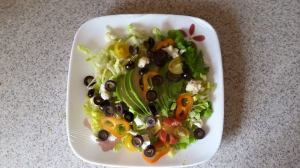
avacado dinner salad

my favorite avocado dinner salad

One of the things I love most about writing is this blog. I have made so many friends though this little place on the internet. Blogging offers me the opportunity to riff for several hundred words on any subject I’m interested in, without interruption. Of course, I’m usually only interested in writing-craft, but this is where I come to discuss it.

Nothing improves your writing chops more than writing every day. Deadlines can be daunting but say what you will about not being able to write under pressure—I think that is when I do my best work.

And, today I don’t feel like talking about writing. I want to discuss food! As many know, I am vegan, but my descent into veganism was (sadly) not motivated by any high moral prohibition against animal cruelty. There is a certain amount of that, but it was always there in the the way I purchased food for my family. During the 1980s, much of our meat we raised ourselves, cage free, free range chickens, and sheep raised in traditional farming methods.

However, I have developed an auto-immune variety of arthritis that is triggered by meat and dairy–all forms of it. Whenever I go off my diet (and cheese is the big draw) I pay the price. So, I stay on my vegan diet and I feel good.

I have discovered a wonderful resource for amazing, healthy, vegan food: the internet.

I know! It’s not just for Facebook and online gaming.

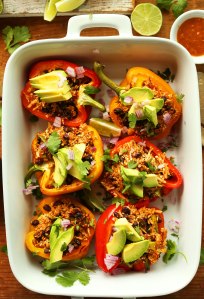
There is information out there, and it’s all in blogs. One of the best sites for me is called The Minimalist Baker. Today the main picture on their site is a gorgeous image of peppers stuffed with cauliflower rice. That image is eye candy. I will definitely be making some form of this recipe.

Oh my gosh! That website, and the recipes Dana and John have put together are just amazing. I use more of their recipes as the basis of my own cooking than from any other website or book.

Changing your diet is difficult, because you have to change your habits. Sometimes you have to change the flavors you love, and learn to like new ones.

And if you are just starting out and can’t afford to buy cookbooks, the internet offers an incredible wealth of free information, and much of it in the form of blogs by people like me.

I love to eat as much as I love to read, and I could easily talk for hours on either subject. If you are passionate about a particular subject, a blog is a great place to talk about it. It brings together people with similar interests, and for a writer, blogging is crucial, as it gets your name out there. Blogging shows people you can write well, and blogging regularly forces you to be creative.

If you want to know more about getting your own blog up and running, see my post of December 14, 2015, Blogging is Writing TooThis post talks about how to use the new default system here at WordPress so that you can insert pictures and make a nice looking post.

  • Keep it down to about 1000 words more or less.
  • Use the spellchecker tool to look for obvious errors.
  • Write in draft form and don’t publish it right away–come back and read it over again, and make corrections.
  • If you use information found elsewhere, quote it and credit the author
  • Use images that are either public domain, or that you have the right to use
  • Put links to other informative sites in the text
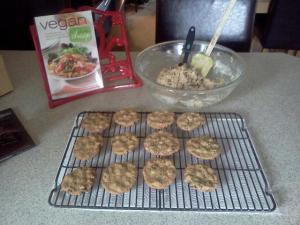
chocolate chip cookies, vegan

chocolate chip cookies, vegan and yummy

Rule number one: be consistent. I began by blogging once a week on a now defunct site—but my actual posts were more often made only once or twice a month. I dreaded it and didn’t want to do it. My blog stats were in the tank because I wasn’t applying myself to it.

It’s a commitment, and authors are procrastinators, but we can write to deadlines when we have to, and it’s good for us.  Now I am writing three posts a week on this blog, and at least one post a week for each of several other venues. I spend Sundays putting my blog posts together, which I couldn’t do if I was still raising children, but you only need to blog once a week to keep your content fresh. Writing this post took me about 45 minutes, so that is a small time commitment.

But just like a healthy diet and a walk in the fresh air, a change of writing scenery is good for you.

6 Comments

Filed under blogging, writing

#amblogging: wanted: flatiron for curly quotes and other blogging twists

300px-Barnum_&_Bailey_clowns_and_geese2Blogging regularly is one of the best ways to improve your writing chops but it can be like working for the circus.  Even when you really know the vagaries of your platform, a lot of strange things can happen in your work. They go unnoticed, doing their thing in the background, keeping it interesting.

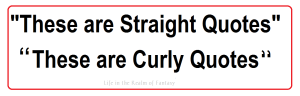
WordPress, the mighty bastion upon which my empire rests, uses ‘fancy quotes’ as the default format. While they do look better in a document, blogging can often be an off-the-cuff thing. Straight quotes are less apt to go awry.  I am not sure why this is the default, nor am I able to find a way to ‘unfancy’ them.

WordPress chooses to make things  fancy, but I don’t need fancy. Judging from the number of posts in their forums on the subject, I am not the only one.

In some places, these curvy morsels of madness are called ‘smart quotes.’ In others, they are ‘curly.’ I don’t like them because sometimes they end up facing the wrong way, and being a bit unobservant, I don’t catch that until after I’ve posted it.

I’ve discovered some out of date plug-ins that are no longer available for uncurling my curly quotes, but alas– ‘no longer available’ is not really helpful. I have a flatiron for my curly hair–I need one for WordPress’s curly quotes.

straight and curly quotesAnother seemingly random thing I’ve discovered the hard way: occasionally I will decide to cut a section and paste it elsewhere, only to find (after having published the post) that the cut section has magically reappeared, and I am now repeating myself, verbatim.

This happens so often that I neurotically look at the menu every time I right-click-cut anything, to make sure I am actually cutting and not merely copying.

I double-check the text. Yes, the cut piece is definitely cut and successfully pasted elsewhere. But when I click ‘save draft’ it magically reappears back in the place from which it was cut, and I am once again repeating myself.

gibberish-american businesses onlineThen there is the hinky formatting. Sometimes the formatting goes crazy  and no matter what I do, the spaces between the paragraphs vanish. My post becomes a wall of words. Highlighting the post and clicking on ‘clear formatting’ does not help.

The spaces will show up on the editing side of the piece, but they will have vanished when the post is saved and published. (Edit: removed repeated line. Cursed fluently.)

My hubby, the programmer, says this is most likely caused by some hidden formatting issue that happens when I am copying from a Word doc and pasting it into the post. I usually write my posts in a Word doc because I catch more mistakes that way. Then I paste it here and, using the ‘preview’ option, check, double-check, and check again for bloopers.

Randomly, the posts are rife with strange formatting that will not be removed no matter what remedy I try. If I was a programmer, I would know exactly what bit of code was causing it and fix it. Alas! I’m only an old lady with just enough knowledge to be dangerous.

Hinky formatting also occurs in my Blogger sites, but not as often. I love the way WordPress looks when it’s all going right, but I love the options Blogger offers and the compatibility with Google products such as YouTube videos. (Blogger is a Google product.)

Dealing with these little issues are why I try to write my posts several days in advance and schedule them for the time I want them to post. Once I have it scheduled, I will let it sit overnight and then come back and read it with fresh eyes. I catch a lot that way, but it’s amazing how many slip by me.

This is why I always say self-editing is not as effective as we’d like. No one sees my blog posts before they are published but me and invariably I miss some whopping eye stopper.

1024px-Trapeze_Artists_in_CircusThe most mysterious problem is the inadvertent posting of a piece that is

  • in the draft stage
  • full of bloopers
  • looks illiterate

Technically, that happens because I get side-tracked and instead of scheduling it as I normally do, for some crazy reason I click ‘publish’ instead of ‘save draft.’

I blame ghosts.

And curly quotes.

9 Comments

Filed under blogging, writing

#amblogging: WordPress Blues

wordpress logoWordPress people…you have pissed me off.

For a year now you have been trying to shove this new, less-than-useful dashboard down my throat, and for that same year, I have refused to use it. You allowed me the option to stay with the expanded version that played to my needs, and so I didn’t complain.

Today, however, you  cut off my simple access to the old, better-for-my-purposes dashboard, and forced me to hunt for a way to get back to it. So rather than the post I had intended, we are going to discuss how a determined blogger can get around your arbitrary decision.

I do not post my blogs from a cell phone. For those people who do, I am sure the bland wall of white fog that is the new default dashboard is fine, but for me it is NOT USEFUL.

First of all, the writing is pale blue and gray.

I have poor eyesight. This is a large world, so I am sure I am not the only blogger out there with compromised vision.

For me, pale blue on white becomes a vast expanse of bluish white, against which I have to strain my eyes to see what few buttons a blogger is allowed the use of.

WordPress new format screenshot empty post


Oh, sure, I posted a while back on how to use  this crappy new dashboard, and I CAN use it. See my post Blogging is Writing Too.

But just so you know, WordPress people, forcibly limiting my options is making me reconsider my loyalty to you.

However, being the stubborn old lady that I am, I have found a way to get back to the old dashboard. You have to know how WordPress works in the first place to find it, but I am tenacious.

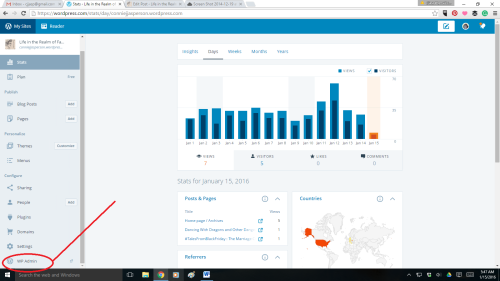
In the upper lefthand corner of the new default dashboard are the words “My Stats.”

Click on this, and it will take you to the stats page.

Stats page 01-15-2016

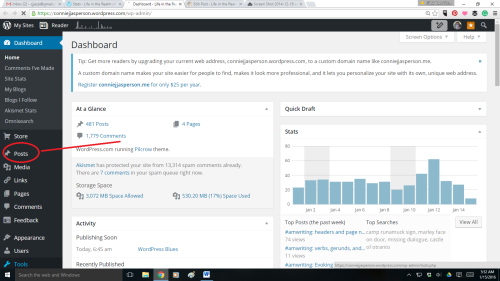
On the left side of the page is a menu, and at the bottom of that menu is the button for “WP Admin.”

As this is my blog, I am that person and when I click on it, it takes me to this page:

Admin Dashboard 01-15-2016

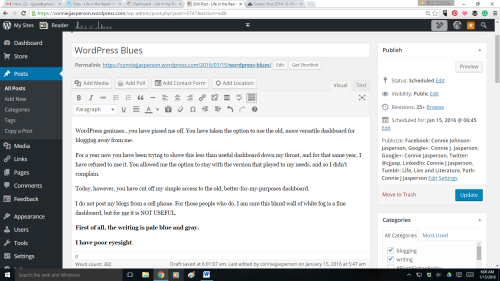
This is the Admin Dashboard. You will note that in the center of the lefthand menu is the word “Posts.

Click on that and you will find yourself able to access all the options you are used to having at your command.

Admin Dashboard with post 01-15-2016

I actually use my dashboard like a professional blogger. But I am also an old lady and when I am thwarted, I get angry.

When I am angry, I blog about it.

WordPress people–I’m sure you have a good reason for limiting a blogger’s ability to access all the tools they may need. However, and I am just guessing here, I suspect that the majority of bloggers are not posting blogs from their cell phones.

People at WordPress:  I suspect that the majority of your bloggers are sitting in front of a PC or laptop.

This blogpost is for all of those people.

106 Comments

Filed under blogging, writing

#amwriting: Blogging is writing too

People wonder why I go to the trouble of blogging regularly. As an indie author, there is no better way for me to let the world know I am here. When a prospective reader googles my name, this blog is the first thing that comes up. WordPress’s stats tell us that over 409 million people view more than 20.3 billion pages each month.

That, my friends, is a LOT of potential readers, and every time I post a blog, I tap into that pool of readers.

So how do you go about getting a piece of that pie for yourself?

‘Life in the Realm of Fantasy’ is a WordPress blog, i.e. I use WordPress because it is a free, open-source blogging tool and content management system.  I also have several other blogs on Blogger (Blogspot), also a free, open-source blogging tool and content management system. I prefer Blogger for ease of use, but I love the way WordPress looks when you get to the finished product stage.

There is a small learning curve for each. But with very few skills, I have a decent-looking blog at no cost to me, using the fine tools and templates provided by the wonderful people at WordPress or Blogspot–and you can too. What you need to know is quite simple, and I’ll provide you with steps and screenshots below.

The thing that is so awesome about both these products is you have the option to use them in what my husband-the-programmer calls ‘wysiwyg’ (pronounced wizzy-wig) or ‘what-you-see-is-what-you-get.’ The user does not have to know any programming or coding–all that is done for you already, and you just organize it the way you want it, within certain limitations.

  1. If you want to use WordPress visit the WordPress home page and select the ‘Sign Up’ button to register for a WordPress account. You’ll need a valid email address (that has not been used to create another WordPress account) to sign up for a new WordPress account. Follow the steps and bam! You have a blog.
  2. But you can also do this via Blogger (blogspot), Google’s free blogging tool and content management system, also an extremely simple process.
  3. I suggest you use your author name. I used Connie J. Jasperson:  https://conniejjasperson.wordpress.com. This links your author name to your blog, which is why you are doing this in the first place. Pick a title for your blog–this one is Life in the Realm of Fantasy.
  4. Once you have your blog set up, and the catchy name picked out, etc it’s time to start writing. Both offer you ability to use html (Text) if you choose, which I don’t have a clue about, or to go with the Visual (what you see is what you get). Unless you are a programmer, stay with ‘Visual.’
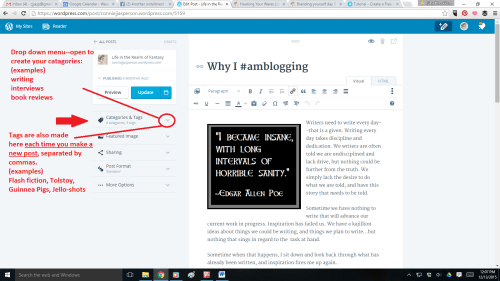
  5. In WordPress, choose a category now for your post–do it first so you don’t forget to do it. I published this post in the categories of Blogging, Self Publishing, Writing.  Each blog post may have a different category, but you decide what your categories are. If you should forget to choose the category, it will go into the ‘uncategorized’ pile–the dreaded WordPress slush-pile where blogs go to die.
  6. Also in WordPress, chose a few TAGS now, if you know what you’re writing about, so that you don’t forget to tag the post.That button is below the Categories list. Chose tags that most represent the core of your post, so that searcher for that subject will find it. For this post I am using ‘blogger, blogspot, blogging, how to use blogger, humor, self-publishing, WordPress, WordPress blog how-to.’
image © cjjasp 2015

image © cjjasp 2015

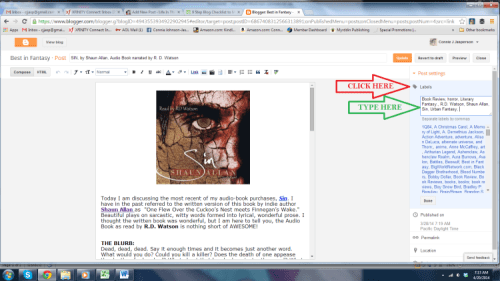
  1. If you are using Blogger, PICK YOUR LABELS NOW–Blogger doesn’t use categories, so your labels are very important. On the right hand side, click on ‘LABELS’ and simply type your key words into the BOX, separated by commas. In Blogger, LABELS are what TAGS are in WordPress, so use words that represent the core of what you are blogging about so that interested searcher will find your blog:

Blogger screen shot

Now that you have that out-of-the-way, it’s time to blog!

  1. Hook me with that catchy blog post title!  Today’s post is called “Blogging is writing too.” Pretty boring.
  2. Put that catchy title in the White box at the top of the page, and DO IT NOW so you don’t forget to give your post a title.

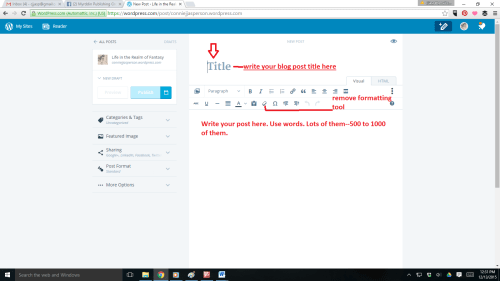
Now there are two paths for you.   You can wing it, keying directly into the post box as I sometimes do, or you can write it on a WORD document and copy and paste it into the body of the post. I have to do that for these posts, but don’t like to because word is rife with HINKY FORMATTING. Sometimes that screws up your blog posts for both Blogger and WordPress, and then you have to use the handy “REMOVE FORMATTING” button that is located in the ribbon (tool box) of both Blogger and WordPress:

WordPress new format screenshot remove formatting tool

Both Blogger and WordPress have spell check functions, and both will save at times as you go, but spell check only picks up misspelled worlds, not other errors.

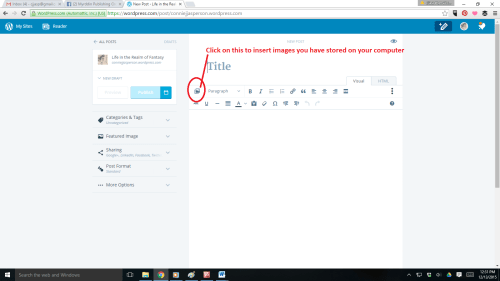
Now we want to add a picture. In WordPress, place your cursor in the body of the blog post and click once at the spot where you will want the image. Then scroll up to the left side of the ribbon (tool box) and click on the little picture in the ribbon (when you hover your mouse over it, it will say ‘insert image’ This menu will appear:

WordPress new format screenshot insert images


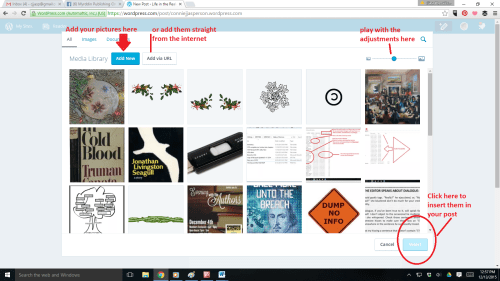
WordPress new format screenshot insert images 2

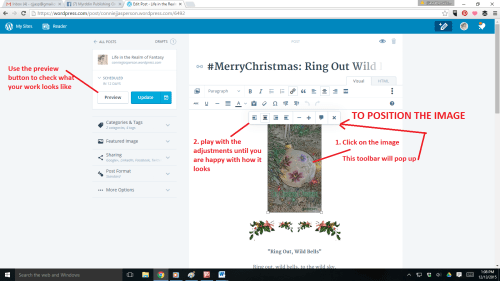
If this is your first blog post, you won’t have anything in your media library yet, so click on “Upload Files.” Practice uploading images and inserting them, playing with it until you feel comfortable and know how to ensure the image will appear where you want it, and will be the size you want it to be. Then, once the image in the body of the post you click on the picture, and a new toolbox opens up. That is where you make your adjustments for positioning and size. You can even add captions:

WordPress new format screenshot insert images 3

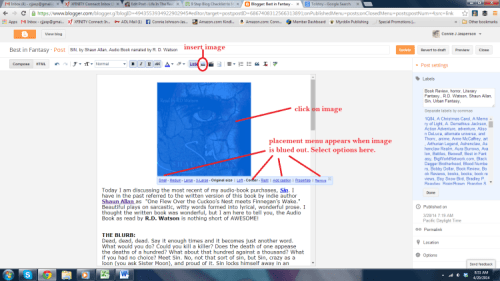
In Blogger you also click on the little picture in the ribbon (when you hover your mouse over it, it will say ‘insert image’). A pop-up menu will appear, and then you will upload the image, decide the placement and the size.  This nearly foolproof simplicity is why most people who have “never done this before” like Blogger more than WordPress.

Blogger screen shot 2

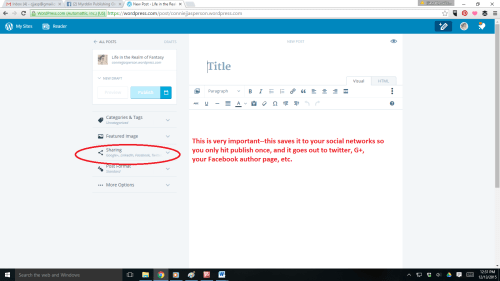
All you have to do now is post your links to Twitter, Facebook, Tumbler and all other  social media you can think of. It is quite easy to set up, and you rarely have to refresh those connections. This is where WordPress really excels:

WordPress new format screenshot sharing

Voilà! You are a blogger. It will take a long time for you to build up good traffic. Posting regularly and frequently gets you more visits and likes, which raises your visibility. This is your opportunity to write a 300 to 1000 word riff on whatever you are doing or thinking about. In my case, it is writing, and all aspects of book culture.

I highly recommend blogging if you are serious about being a author, as it helps develops your writing craft, especially when you have to go in and edit out your mistakes (use the preview option). People expect blogs to be a little rougher than other work as it is usually written on the wing, but try to do your best work—you want people to buy your books, and they won’t if your blogposts seem illiterate.

5 Comments

Filed under Blogger, blogging, writing

Why I #amblogging

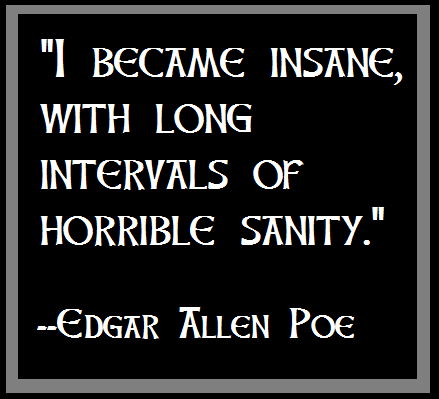
edgar allen poe quoteWriters need to write every day–that is a given. Writing every day takes discipline and dedication. We writers are often told we are undisciplined and lack drive, but nothing could be further from the truth. We simply lack the desire to do what we are told, and have this story that needs to be told.

Sometimes we have nothing to write that will advance our current work in progress. Inspiration has failed us. We have a kajillion ideas about things we could be writing, and things we plan to write…but nothing that sings in regard to the  task at hand.

When that happens, I sit down and look back through what has already been written, and inspiration fires me up again.

Other times, nothing. That is when I blog on the craft of writing. The act of blogging loosens my imagination when it is stuck.

One of the first chores I was given by my first publisher, was to blog regularly, at least once a week. This, he said, would help get my name out there, and give me a regular platform for my opinions.

I had no idea what I would ever blog about, and the idea of just sitting down and rambling on about nothing and then publishing it made me feel a bit faint. I have no issue with rambling on–I am grandma, it’s what I do. But publishing it weekly?

It began, as all love affairs do, somewhat awkwardly. I wrote short, stilted posts that were obviously forced and took days to write. I felt like blogging had taken up a large chunk of real estate in my writing time, and I resented it.

Then one day I didn’t know what to write about. The only thing I was interested in talking about was either books I had read or books I was writing. I found the words flowed easily when I talked about either of those. Thus was born this blog, Life in the Realm of Fantasy. This is where I talk about everything from Don Quixote to serial commas.

Blogging regularly has helped me to write more freely when I am using a stream-of-consciousness style of writing, such as during NaNoWriMo.

I have also made many friends through blogging, people all over the world who I may never meet in person, but who I am fond of, nevertheless.

And blogging is where I develop my seminars on the craft of writing. I find that talking to you about the craft helps me organize my thoughts. And, although I hate to say it, my first publisher was right about blogging. Blogging regularly does get your author name out there and does showcase what you are able to do.

I recommend blogging to anyone who has a craft they are passionate about. You want to talk about that craft, but your spouse’s eyes glaze over when you launch into one of your discussions.

Well, let me tell you, the internet is full of folks who want to talk about that same craft. Take welding–there are hundreds of blogs about welding, some popular, and some just getting started. Who knew welding was such a hot topic? Obsessed people make poor conversationalists, but writing a weekly blog about what you are passionate about gives you that platform to wax poetic about what you love.

If you want to know more about getting your own blog up and running, see my post of April 20, 2014: The Girl with the Tolstoy Tattoo:

  • Keep it down to about 1000 words more or less.
  • Use the spellchecker tool to look for obvious errors.
  • Write in in draft form and don’t publish it right away–come back and read it over again, and make corrections.
  • If you use information found elsewhere, quote it and credit the author
  • Use images that are either public domain, or that you have the right to use
  • Put links to other informative sites in the text

Blogging is fun. It’s where I blow off steam and grow as a writer. Every author should blog regularly–some of my most inspired moments have happened here in this crazy blog.

2 Comments

Filed under Humor, Literature, Publishing, Uncategorized, writer, writing

Wordless Dictionaries

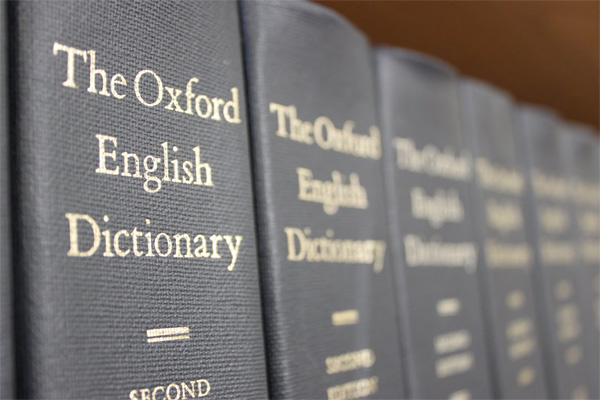
oxford_dictionaryWe are in the midst of an extreme shift in the English language, a continual evolution as impossible to stop as the  melting of the Antarctic ice-cap. This change is not necessarily a terrible thing, but it does come along with some interesting complications.

Robert Macfarlane discussed one negative aspect of our language shift in a blog post last week for The Guardian. He is not  saying that the rapid shift in our dialect and word-usage is bad–after all, language needs to be spoken and it is like water: it’s always on the move and incredibly difficult to contain.

cowslip

cowslip

But Macfarlane sees a negative in the modern view of this fluidity, one that struck a real chord with me: “Under pressure, Oxford University Press revealed a list of the entries it no longer felt to be relevant to a modern-day childhood. The deletions included acorn, adder, ash, beech, bluebell, buttercup, catkin, conker, cowslip,cygnet, dandelion, fern, hazel, heather, heron, ivy, kingfisher, lark, mistletoe,nectar, newt, otter, pasture and willow. The words taking their places in the new edition included attachment, block-graph, blog, broadband, bullet-point, celebrity, chatroom, committee, cut-and-paste, MP3 player and voice-mail. As I had been entranced by the language preserved in the prose‑poem of the “Peat Glossary”, so I was dismayed by the language that had fallen (been pushed) from the dictionary. For blackberry, read Blackberry.”

Now, admittedly Robert Macfarlane is an avid reader of literary fiction, and he also writes literary and travel books. However, many people are  still reading above the comic book level, and what he has to say in his piece concerns the dumbing-down or “flattening” of the language. Don’t try to tell me there isn’t enough room in the book for these words. Dictionaries are on-line now and there is in infinite amount of space in the internet for these words.

oxford school dictionaryDictionaries are the first reference book children will come into contact with in their schools, followed closely nowadays by Wikipedia. I admit that in a desk-reference form space is limited, but in a world where Blackberry means a smart-phone, there is no lack of space.

How will the landscape of our language look in fifty years? I sometimes doubt I would be understood, speaking in my ancient Northwest American dialect, using words that have no relevance. Without a comprehensive dictionary, how will the words I write today be understood by my great-grandchildren?

If I could say one thing to those who compile dictionaries it is that ALL the many words that make up our English language  have relevance and should be  included in what is being marketed as a truly comprehensive dictionary. At some point, a curious reader is going to want to know the meaning of a word, and if that word appeared in the dictionary  at one time, why must it be removed just because a committee of naive scholars with extremely limited experience feels it is not needed?

_72982736_vikings courtesy of BBCTo me, this is tantamount to a mass burning of books just because they contain “dangerous ideas.”

I have one thing to say to the modern publishers of dictionaries: You have unlimited space in an on-line dictionary. When you allow words to fall out of the dictionary because they have fallen out of common use in YOUR milieu,  your dictionary is not as comprehensive as you are pretending it is. You have lost YOUR relevance at that point.

These mongers of wordless dictionaries should feel some shame, because they are as responsible for the dumbing-down of the English language as is the casual speaker. Their own relevance is questionable, as more and more seekers of quick information will find it in the bowels of the fount of all knowledge, Wikipedia, OR they will Google it, as I did the word “inexorable.”

6 Comments

Filed under Adventure, Battles, Books, Fantasy, Humor, Literature, Publishing, Self Publishing, Uncategorized, writer, writing